Secure

Find it, explain it,
fix it.

XpressOps checks every endpoint against Windows hardening basics, matches installed software to known vulnerabilities, and turns security alerts into a short inbox of explained incidents. A person approves every fix.

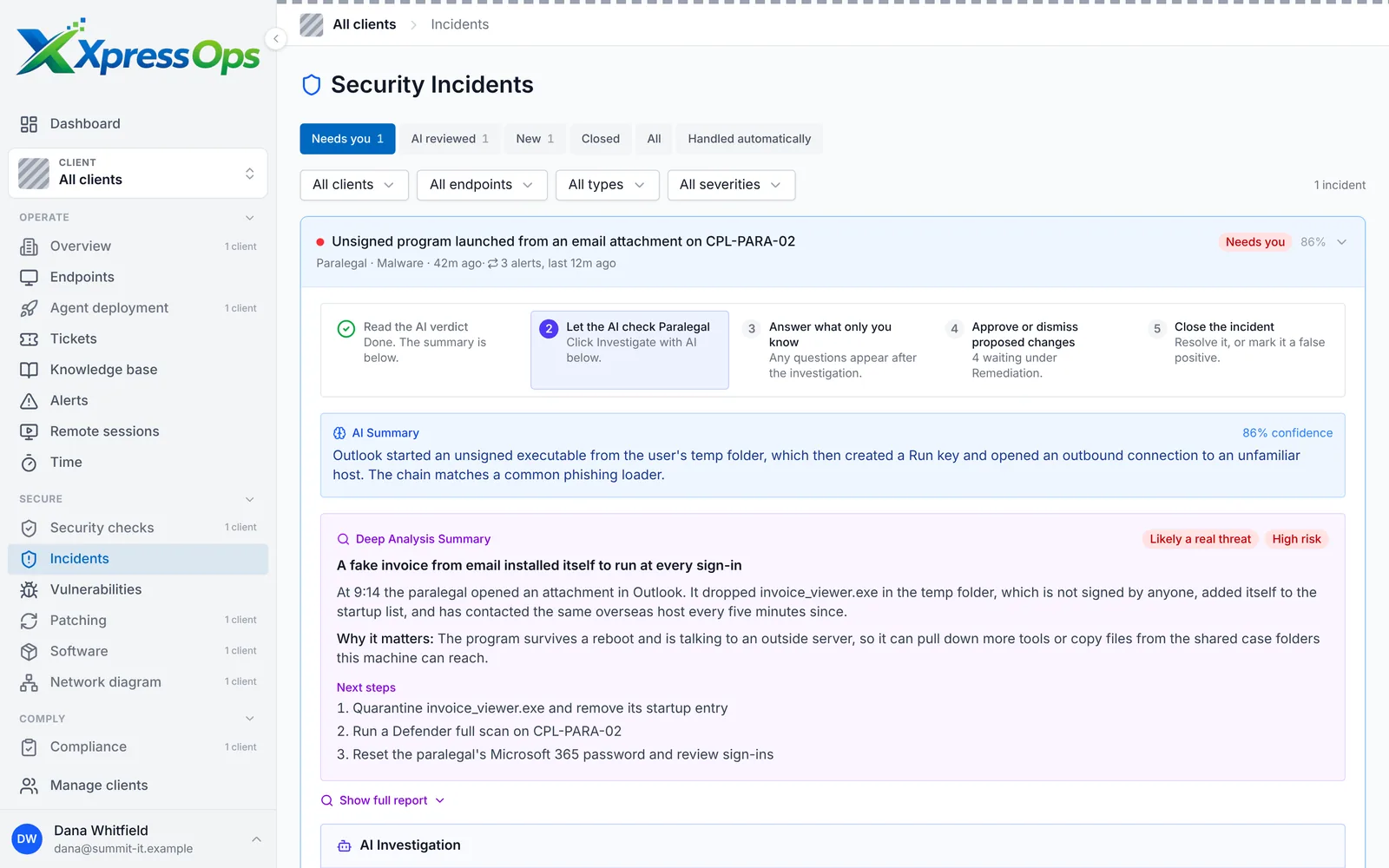
An expanded security incident marked Needs you: AI summary, deep analysis rated a likely real threat with next steps, and an AI investigation.

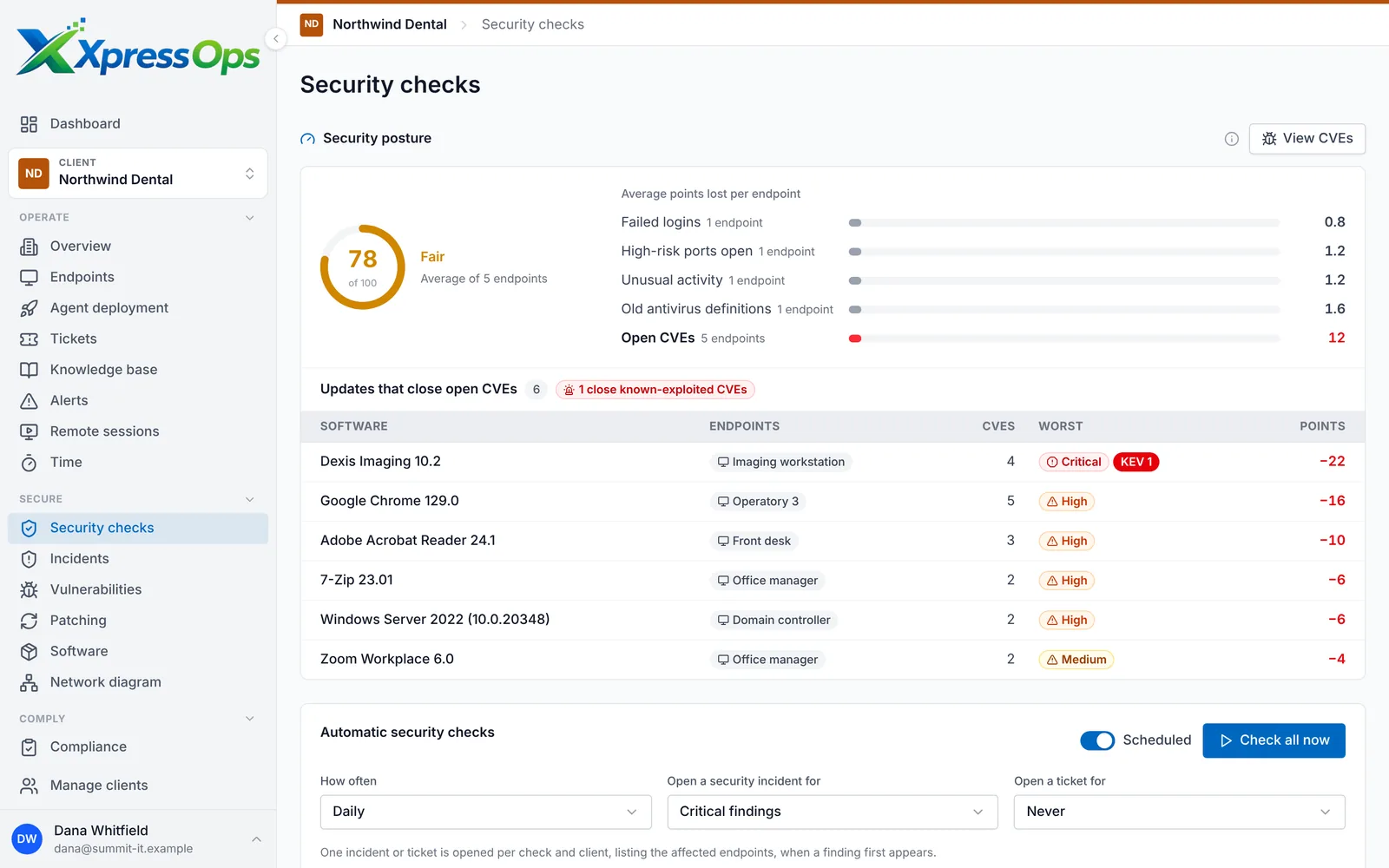
Security checks and posture

One score per client, and exactly what is costing points.

Each client gets a posture score out of 100, built from failed checks, risky open ports, unusual activity, old antivirus definitions and open CVEs. Known-exploited vulnerabilities weigh more. The page shows which software update would close the most risk.

  • 21 Windows hardening checks on every endpoint
  • Run fix from the console, with a confirmation and an audit entry
  • Updates ranked by the CVEs they close
  • SMBv1 enabled
  • RDP without Network Level Authentication
  • System drive not encrypted
  • Windows Firewall off
  • No active antivirus
  • Antivirus signatures out of date
  • LLMNR enabled
  • SMB signing not required
  • LM or NTLMv1 allowed
  • WDigest stores passwords
  • LSA protection off
  • Secure Boot off
  • User Account Control off
  • TLS 1.0/1.1 or SSL enabled
  • Guest or built-in Administrator enabled
  • Print Spooler on a domain controller
A client's security posture score with open security checks, open CVEs and the updates that would close them.

Vulnerabilities

Known vulnerabilities, matched to the software you actually run.

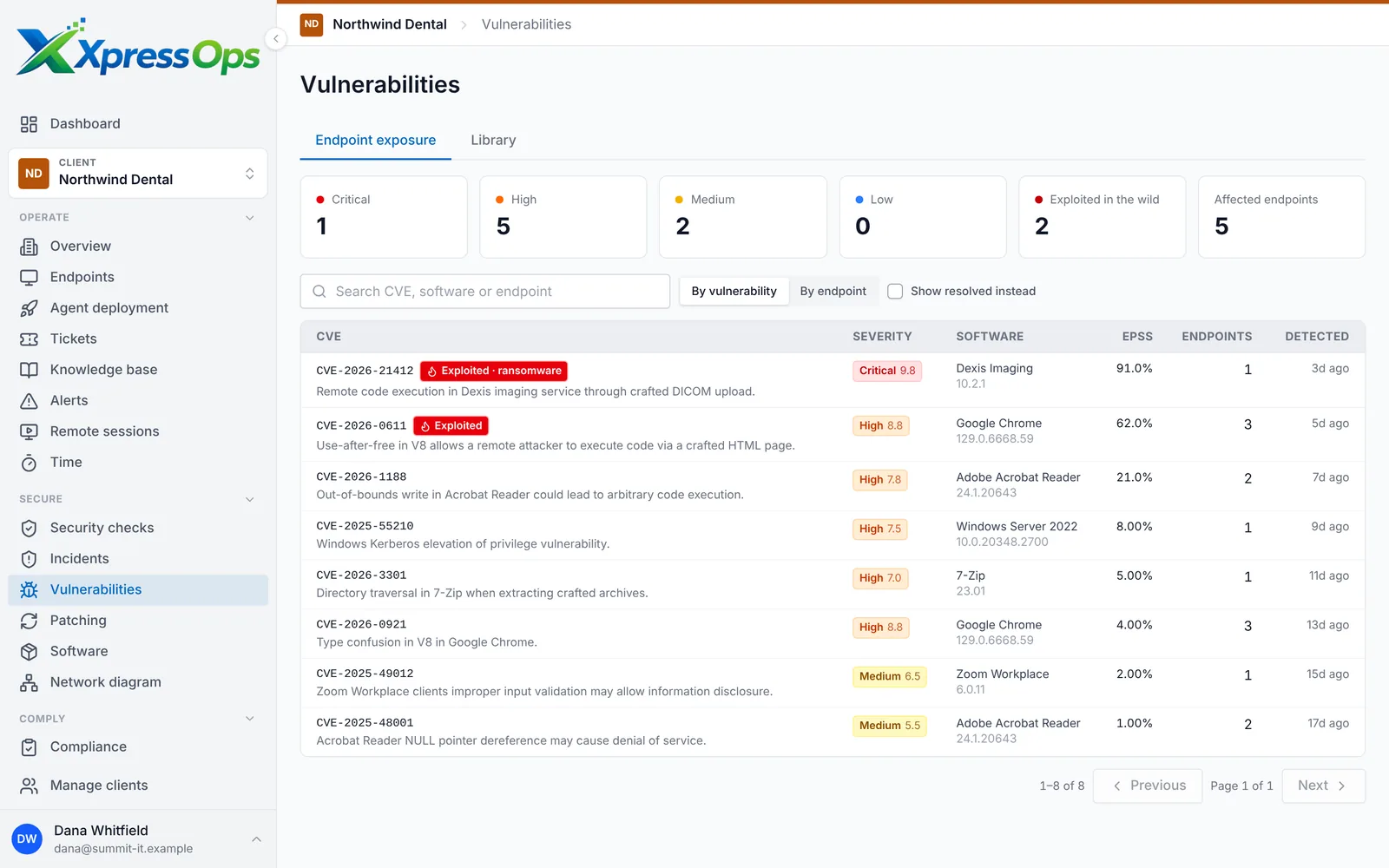
Installed software is matched to CVEs from the National Vulnerability Database, flagged when it is on CISA's Known Exploited list, and scored by exploit likelihood. For programs no mapping covers yet, an AI agent drafts mappings verified against NVD, so coverage grows without someone typing them in.

  • Severity, known-exploited and exploit-likelihood on every CVE
  • Exposure by CVE, by endpoint and by client
  • AI-drafted software mappings, checked against NVD
The Vulnerabilities page listing CVEs found on endpoints with severity, known-exploited flags and affected machines.

Security inbox

Start the day with what needs you.

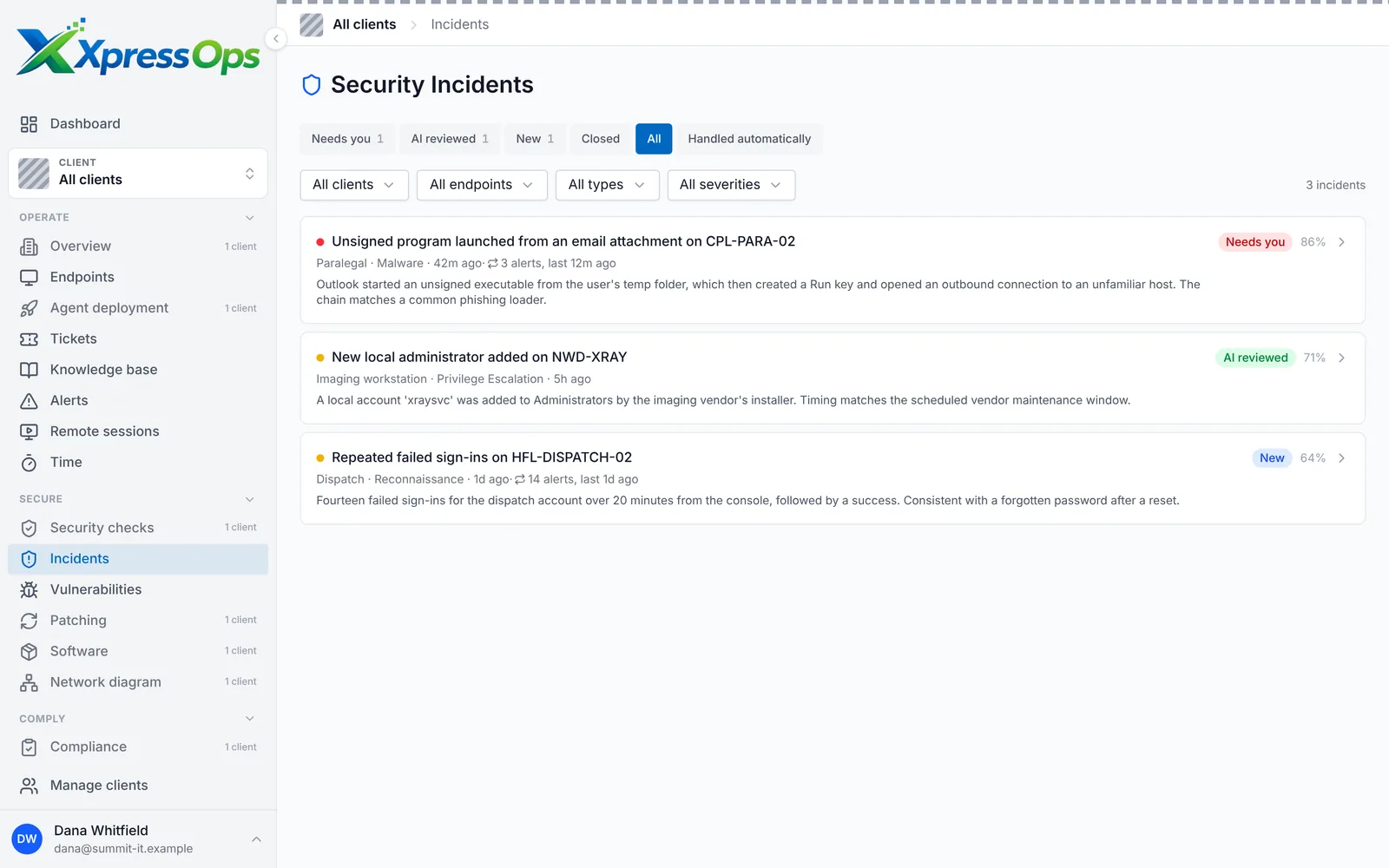
Incidents are sorted by who acts next. Needs you holds the ones the AI could not settle or rates a real threat. AI reviewed holds the likely harmless ones. New is waiting for the AI, which analyzes warnings and criticals within about ten minutes.

  • One incident per device and detection, with a count
  • Filter by client, endpoint, type and severity
  • Reply to the AI to add context it could not see
The security inbox with stages: Needs you, AI reviewed, New, Closed, and Handled automatically.

Incident response

From alert to fixed, with a person in the loop.

Most small teams drown in security alerts or ignore them. XpressOps turns them into explained incidents, then lets you fix the endpoint from the same screen.

  1. 01

    Triage

    Alerts become one incident, not fifty

    AI triage reads new security alerts every few minutes. Repeats for the same device and detection join the open incident, so a noisy machine shows up once with a count.

  2. 02

    Explain

    A summary a client could read

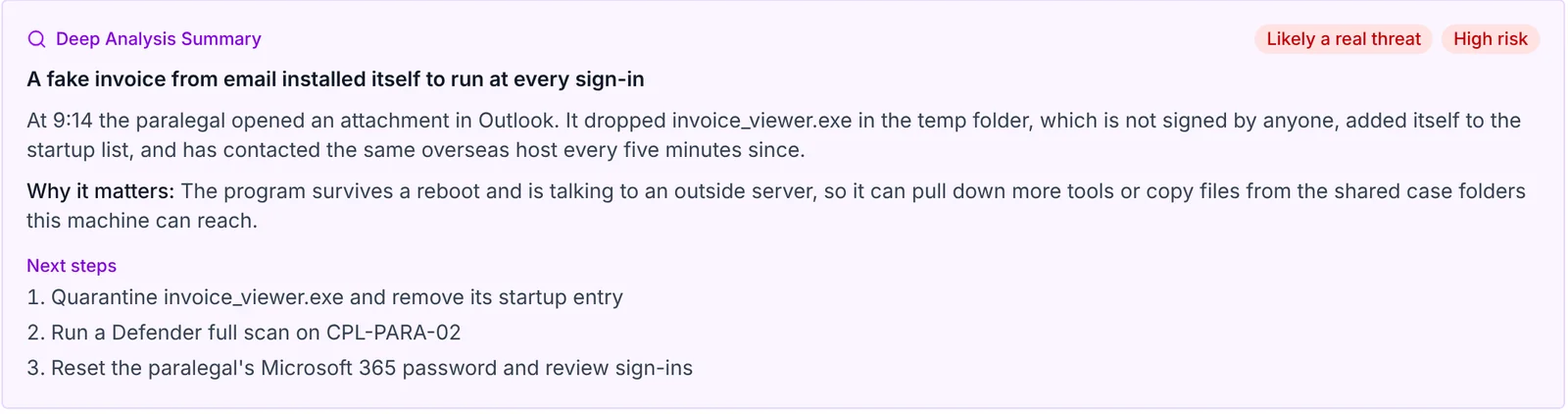
    Deep analysis reviews the device's recent history and leads with a verdict, a risk level, what happened, why it matters, and the next steps. An AI investigation can dig further and ask you what only you would know.

  3. 03

    Fix

    Remediation you approve, and can undo

    The agent collects read-only evidence: who signed each program, what starts automatically, local accounts, Defender status. The AI proposes actions; nothing runs until a technician approves it.

    • Defender quick, full or folder scans
    • Stop and quarantine a file
    • Disable a service, scheduled task or startup entry
    • Isolate the endpoint from the network
    • Disable a local account
  4. 04

    Close

    The quiet ones close themselves

    Incidents the AI rates low risk close after seven quiet days, and ones raised by a security check close when the check passes again. Each says why it closed.

A deep analysis summary rated likely a real threat and high risk: what happened, why it matters, and three next steps.

Actions run as vetted PowerShell templates. The AI can only point at evidence by ID, and Microsoft-signed files, the Windows folder and the agent itself are off limits.

Also in Secure

Handled automatically

Save a harmless alert as a pattern. Patterns expire, carry a severity ceiling, and never cover antivirus tampering, log clearing, persistence or account changes.

Scheduled checks

Run every check daily or on demand, and choose whether critical findings open an incident, a ticket, or both.

Security telemetry

The Windows Security log, process ancestry, network connections and antivirus state come from the same agent. No second tool to deploy.

Isolation that undoes itself

An isolated endpoint stays reachable by XpressOps, and releases itself if the agent loses contact.

Everything on the record

Every fix, approval, pattern and incident change is written to an append-only audit log with who, what and when.

Posture over time

Per-client scores turn a stream of findings into a trend a client can be shown at a quarterly review.

Start with the clients you already worry about

See it with a fleet like yours.

Tell us what you run, how many endpoints, and which frameworks your clients answer to. We will walk you through it against a setup that looks like yours, not a canned tenant with four tidy devices in it.

We read every message. No newsletter, no sequence — a person replies.